You’ve got a great product. You’ve got the pitch. You even know your target clients by name.
But your website? It’s quietly killing deals before your sales team ever gets the call.
Here’s the cold truth: most B2B buyers do 70–80% of their decision-making before they even land on your website. And when they do arrive — usually after reading three comparison posts and skimming a Reddit thread — they want clarity, credibility, and a reason to stay.
If your homepage opens with “We are a customer-focused solutions provider,” you’ve already lost them.
This is exactly why choosing the right B2B website template matters more than most founders realize. The right template isn’t just a pretty layout — it’s the architecture of your first impression, your sales pitch, and your trust signal, all in one screen.
In this guide, you’ll find everything: what makes a great B2B website template, how to choose one, where to get them for free, and which platform delivers professional-grade designs without a single line of code.
📌 Key Takeaway: 94% of first impressions are design-related, and you have just 50 milliseconds for a visitor to form an opinion after landing on your site. Your template sets that tone instantly.
What Is a B2B Website Template?
A B2B (business-to-business) website template is a pre-built, professionally designed website layout crafted specifically for companies that sell products or services to other businesses — not direct consumers.
Think IT consulting firms, manufacturing suppliers, SaaS companies, wholesale distributors, logistics providers, business consulting agencies. The audience is sophisticated. The decision-making is committee-driven. And the stakes per deal are high.
A B2B website template gives you:
- Pre-structured page layouts (homepage, services, about, contact)
- Navigation designed for business decision-makers
- Section blocks for case studies, testimonials, and team credentials
- CTAs oriented around demos, consultations, and quotes (not impulse purchases)
The difference between a B2B template and a generic business template is subtle but significant. B2B layouts prioritize trust signals and value clarity over aesthetic flair. Every section earns its place by moving a potential client one step closer to picking up the phone.
Why Your B2B Website Design Is a Revenue Decision
Before we get into templates, let’s get one thing straight: a B2B website isn’t a branding exercise. It’s a revenue asset.
More than three-fourths of B2B eCommerce buyers consider site design the number one factor in deciding to make a purchase. Meanwhile, 48% of people say website design is the number one factor they use to determine a business’s credibility.
Here’s what the data says about the gap between average and excellent:
|
Metric
|
Average B2B Site
|
Top Performing B2B Site
|
|
Visitor-to-lead conversion rate
|
1.5%
|
8–15%
|
|
First impression formation
|
50 milliseconds
|
50 milliseconds
|
|
Users who won’t return after bad UX
|
88%
|
88%
|
|
Buyers who rely on websites early in purchase journey
|
70% to 80%
|
80% to 90%
|
|
Site design’s influence on first impression
|
~94%
|
94%
|
The average B2B website turns just 1.5% of visitors into leads. Top performers reach 8 to 15%. That gap is not a small tweak — it is a business-changing difference.
The right template gets you into that top performer bracket from day one.
What Every Great B2B Website Template Must Have
Not all templates are created equal. Here’s what separates a template that looks good from one that actually works:
1. A Crystal-Clear Value Proposition Above the Fold
The best B2B websites lead with clarity over cleverness. They state what they offer, who it’s for, and why it matters — without burying the message in jargon or vague taglines.
Your hero section should answer three questions in under five seconds:
- What do you do?
- Who do you do it for?
- Why should they care?
2. Trust Signals Baked Into the Layout
75% of visitors see well-designed websites as more trustworthy, directly influencing their decision to engage with your brand.
Your template should have dedicated sections for:
- Client logos (right below the hero — don’t bury them)
- Testimonials and case study previews
- Certifications, awards, or industry affiliations
- Real numbers and results
3. Conversion-Focused CTAs at Every Stage
Don’t make visitors hunt for the next step. A great B2B template places strategic CTAs — “Request a Demo,” “Get a Quote,” “Schedule a Call” — at key scroll points. Not just at the top and bottom.
4. Mobile-First, Always
77% of searches come from mobile, and 84% of users will form a negative impression if the mobile experience disappoints. Your template must be fully responsive by default.
5. Modular Section Blocks
The best templates are built in reusable blocks — hero, features, testimonials, CTA, FAQ, footer. This means you can rearrange, add, or remove sections without touching a line of code. Especially important if you’re using a block-based website builder.
6. Clean Navigation That Mirrors the Buyer Journey
B2B buyers are time-poor. Your navigation should reflect the journeys your visitors actually take, not your internal org chart. Organize by industry, use case, or buyer type — not by your department structure.
Types of B2B Website Templates You Need to Know
🔵 Business Consulting Website Templates
Designed for strategy firms, management consultants, and advisory services. These templates feature strong typography, case study sections, team credential bios, and refined color palettes (often dark navy, forest green, or slate grey) that communicate authority.
What to look for: Prominent “Book a Consultation” CTAs, service page templates, blog/insights section.
🟢 IT Consulting Website Templates
Technical buyers are skeptical by nature. IT consulting templates lean on structure and substance: service breakdowns, technology stack icons, security badges, and ROI-focused messaging. Clean, often minimalist designs with structured grids work best here.
What to look for: Technology logos section, problem-solution layout, detailed service pages, and integration showcases.
🟡 Technology Consulting Website Templates
For digital transformation firms, cloud service providers, and tech-forward agencies. These templates tend to use bolder design systems — gradients, dark mode options, subtle animations — while maintaining the professional credibility B2B buyers demand.
What to look for: Product demo previews, client ROI stats, interactive UI elements.
🔴 Distributor Website Templates
Built for wholesale suppliers, industrial distributors, and B2B product companies. These templates often mirror B2B eCommerce patterns: product catalogs, bulk ordering prompts, industry/vertical navigation, and account-based login flows.
What to look for: Category-based navigation, product grid sections, RFQ (request for quote) forms.
⚫ SaaS / Software B2B Website Templates
The most competitive category. SaaS templates are purpose-built for the subscription economy: free trial CTAs, feature comparison tables, pricing page sections, integration badges, and onboarding flow previews.
What to look for: Pricing page template, feature grid, product screenshot sections, G2/Capterra review badges.
B2B Website Templates: Free vs. Paid — What’s Actually Worth It?
Let’s settle this debate.
|
Features
|
Free Templates
|
Premium Paid Templates
|
Free Premium (aBlocks)
|
|
Design Quality
|
Variable
|
High
|
High
|
|
Customization
|
Limited
|
Full
|
Full
|
|
Support
|
Community
|
Priority
|
Active community
|
|
Page Speed
|
Variable
|
Optimized
|
Optimized
|
|
No-Code Editing
|
Sometimes
|
Usually
|
Yes
|
|
Cost
|
$0
|
$20–$200+
|
$0
|
|
Regular Updates
|
Rarely
|
Often
|
Yes
|
Here’s the thing most people get wrong: “free” doesn’t have to mean “basic.”
The Best Place for Free B2B Website Templates in 2026: Template-Kits.com
Let’s talk about the smartest move you can make right now.
Template-Kits.com is a library of premium, professionally designed website templates — built on aBlocks, a WordPress block-based website builder. And they’re completely free.
Not “free with limits.” Not “free trial.” Fully free.
Here’s what makes this genuinely impressive:
🏆 Designed by Professional Designers, Not Algorithms
Every template in the library is crafted by professional designers — the kind of people who know why whitespace matters, how color contrast drives trust, and where to place a CTA so it actually gets clicked. These aren’t cookie-cutter layouts. They’re polished, considered, and built to compete.
⚡ Powered by aBlocks — The WordPress Builder That Changes Everything
aBlocks is a WordPress Gutenberg plugin that brings drag-and-drop simplicity to WordPress without the bloat of older builders. Real users describe it this way:
“aBlocks has completely changed how I see Gutenberg. The customization options are incredibly intuitive, and everything feels polished and professional. It’s like Gutenberg finally found its missing piece.”
“There is no way I have interest to build a website by using Gutenberg, until aBlocks comes with all new intuitive features. The right sidebar is mindblowing.”
(Source: template-kits.com user testimonials)
🎯 One-Click Import. Full Customization After
The workflow is clean:
- Browse templates at template-kits.com
- Import in one click via aBlocks
- Customize every block — colors, fonts, images, layout — without touching code
- Publish
No developer required. No waiting on a design agency. No four-figure invoices.
📐 Works With Any WordPress Theme
Whether you’re using a classic theme or a modern block theme, aBlocks templates integrate cleanly. You’re not locked into a proprietary ecosystem.
🔄 New Templates Added Continuously
The library grows regularly with fresh designs across industries — including business consulting, technology, IT services, corporate, and more.
B2B Website Design Trends You Need in Your Template (2026)
Choosing a template isn’t just about looks. It’s about making sure your site speaks the language of 2026 buyers.
1. Conversion-First Architecture
In 2026, the design conversation isn’t about bounce rate or time-on-site — it’s about whether your website is contributing to revenue. Look for templates built around actions, not aesthetics.
2. Modular, Component-Based Design
Design ops and content ops are merging, and modular design is the common language. Templates built in interchangeable blocks let you update your site without a designer on call.
3. Social Proof Positioned Early
Top-performing B2B websites don’t save client logos and testimonials for the bottom of the page. They embed them in the hero section. Your template should make this easy.
4. Clear Dual Audience Navigation
If your B2B product serves different buyer types (e.g., executives vs. IT teams), your template should allow segment-based navigation. The best B2B homepages have distinct sections easily accessible through intuitive navigation, with each area visually differentiated through strategic colour application.
5. Speed-Optimized Structure
A 1-second improvement in page load time can increase B2B conversions by 7%. Lightweight templates built on clean code outperform heavy, plugin-bloated alternatives over and over.
How to Choose the Right B2B Website Template for Your Business
Here’s a practical framework:
Step 1: Define your primary visitor action. Is it “book a demo,” “request a quote,” or “download a guide”? Every template decision should serve this action.
Step 2: Map your buyer personas. Are you targeting C-suite executives, procurement managers, or technical leads? Each persona responds to different design signals. Executive buyers want credibility. Technical buyers want detail. Procurement managers want clarity.
Step 3: List your must-have sections. For most B2B businesses, this includes: hero, about, services/features, social proof (client logos + testimonials), a lead magnet section (case study, demo, consultation), and contact.
Step 4: Filter for mobile and speed. Preview any template on mobile before committing. Test it with Google PageSpeed Insights if possible.
Step 5: Check customization depth. Can you change the layout structure, not just the colors? The best templates — especially those built on aBlocks — give you full control at the block level.
B2B Website Design Examples: What the Best Ones Have in Common
Looking at the top-performing B2B websites in 2026 — from HubSpot to Notion to Slack to Zendesk — a few patterns emerge consistently:
The best B2B websites showcase clear messaging, trust-building signals, and design focused on converting visitors. Specifically:
- HubSpot: Strong free tool offering that drives leads while demonstrating the product. Clear “Get a Demo” CTAs paired with an educational content library.
- Notion: Minimalist design where every unnecessary element is stripped away. Product shots and custom illustrations do the talking.
- Slack: Bold, focused messaging with benefit-first copy. Conversion path is obvious within three seconds.
- Zendesk: Complex solutions made accessible through clear visual hierarchy and audience-segmented navigation.
The template you choose should make these patterns easy to replicate — not require you to rebuild from scratch.
The Bottom Line: Don’t Build From Scratch When You Don’t Have To
Here’s the GQ-level truth about B2B websites in 2026:
Your buyers are sophisticated. They’ve seen hundreds of business websites. They know within seconds whether your project’s confidence or doubt, expertise or effort, authority or anxiety.
A great template closes that credibility gap immediately — and the right builder lets you customize every pixel to match your brand.
Template-kits.com is where that intersection happens. Free, professionally designed, fully customizable B2B website templates powered by aBlocks — built by designers who understand what converts, not just what looks good in a screenshot.
🚀 Ready to Build Your B2B Website?
Browse the full template library at template-kits.com — install aBlocks, import your template in one click, and launch a professional B2B website without writing a single line of code.
The best time to build your B2B website was yesterday. The second-best time is right now.
B2B Website Templates: Frequently Asked Questions
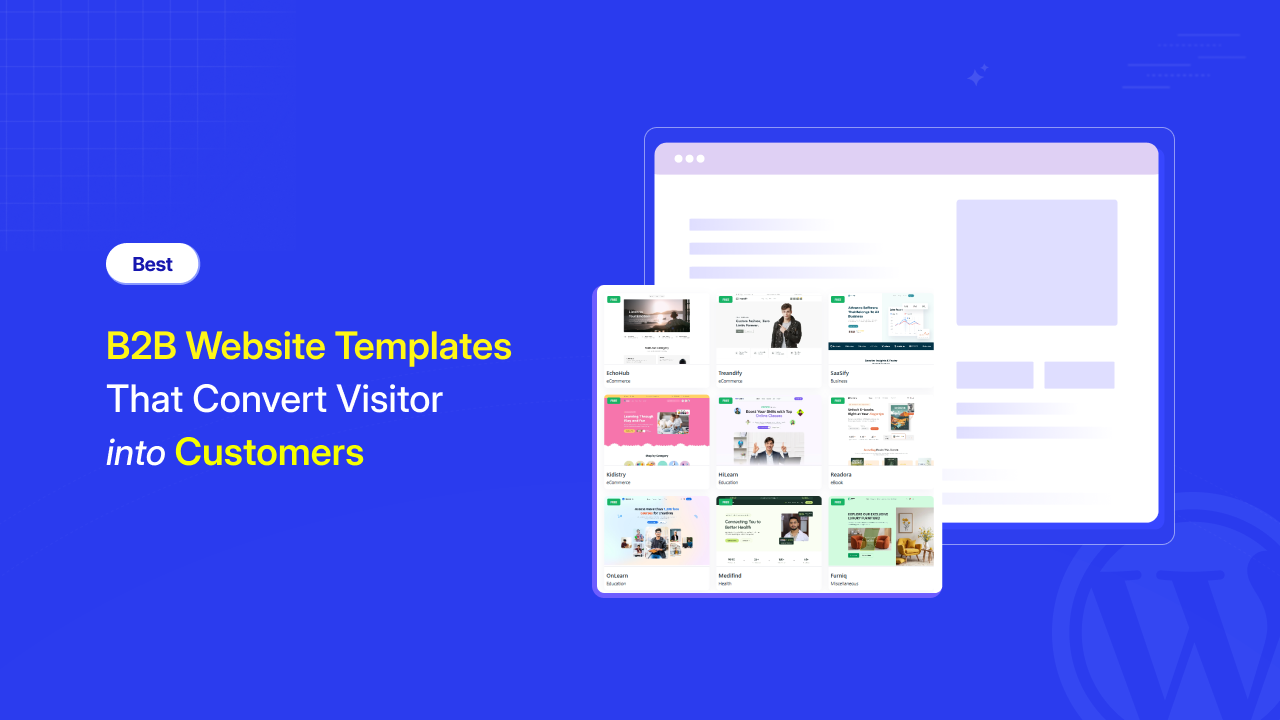
B2B-Website-Templates-That-Convert-Visitor-into-Customers.
Yes. Several sources offer free B2B templates, including Webflow, Colorlib, and ThemeForest (limited free options). But the most impressive free premium templates are available at template-kits, where professional-grade designs are completely free and powered by the aBlocks WordPress builder.
Can I get a B2B website template as an HTML download?
Yes, pure HTML/CSS B2B website templates are available on platforms like ColorLib, HTML5UP, and HTMLrev. These are best for developers who want full code control. If you prefer no-code customization, block-based templates via aBlocks offer more flexibility without requiring coding knowledge.
What is the best B2B website design approach?
The best B2B website design leads with a clear value proposition, embeds trust signals early, structures navigation around buyer journeys, and drives a single primary conversion action. Templates that support all of this out of the box — like those at template-kits.com — give you a significant head start.
What makes a B2B website different from a B2C website?
B2B websites serve longer, more rational decision cycles involving multiple stakeholders. They prioritize credibility, detailed information, case studies, and consultation-based CTAs over impulse-purchase triggers. B2B templates reflect this with more structured layouts, professional visual languages, and content-heavy page types.
Do I need a developer to use a B2B website template?
Not if you use the right platform. aBlocks on WordPress (via template-kits.com) is fully no-code. You import a template with one click and customize every block visually — no development skills required
What’s a good distributor website template?
A distributor template should feature strong product catalog organization, a clear request-for-quote form, industry/category-based navigation, and trust signals oriented toward procurement buyers (certifications, client brands, delivery guarantees). Template-kits.com includes professional templates across these industry verticals.
What should a basic business website template include?
At minimum: a hero section with a clear offer, an about/team section, a services/product section, testimonials or case studies, and a contact form or CTA. For B2B specifically, adding a case study or social proof block significantly improves trust and conversion.